
AWS S3 Authentication Methods Compared: Static Keys, IAM Roles, STS, and OIDC
Compare AWS S3 authentication methods by leak blast radius, credential lifetime, and rotation cost. Decision matrix maps each deployment shape to the right auth mode.
Hands-on lab available: Provision an IAM OIDC provider, a repo-scoped role, and a working GitHub Actions workflow that authenticates to S3 without long-lived keys. Go to the lab
Your S3 Auth Method Determines the Leak Blast Radius
The S3 authentication method you choose largely determines the blast radius when a credential leaks. Leaked long-lived access keys remain the most common root cause of published AWS security incidents, and the S3 credentials you hand to a client determine how long an attacker keeps access after a leak, whether rotation is automatic, and how much of your account a stolen secret can reach. Treat the choice as a security decision.
This article is a decision guide across the authentication methods the AWS SDKs expose for S3: static access keys, environment variables, the shared credentials file (named profiles), EC2/ECS/EKS instance roles, STS AssumeRole, anonymous access, and the default credential chain that combines them.
The Ways to Authenticate to S3
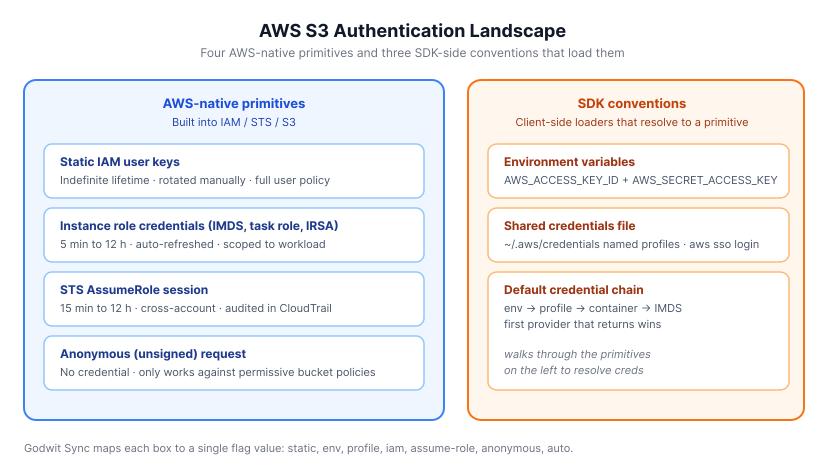
AWS S3 accepts requests signed by a handful of credential mechanisms. Four are AWS-native primitives built into the service and the STS API (static IAM user keys, temporary session credentials from instance metadata, temporary session credentials from AssumeRole, and unsigned anonymous requests). Three are SDK-side conventions for loading those primitives (environment variables, the shared credentials file, and the default provider chain that walks through them in order).
- Static access keys: a long-lived
AWS_ACCESS_KEY_ID+AWS_SECRET_ACCESS_KEYpair issued to an IAM user, valid until rotated. - Environment variables: the same static pair, exported to the process environment instead of passed on the command line.
- Shared credentials file:
~/.aws/credentialswith named[profile]sections, optionally populated byaws sso login. - Instance roles (IMDS, task role, IRSA): short-lived credentials delivered by AWS infrastructure to workloads running on EC2, ECS, or EKS.
- STS AssumeRole: the caller signs an
sts:AssumeRolerequest and gets back short-lived credentials scoped to a different IAM role, typically in another account. - Web identity (
AssumeRoleWithWebIdentity): a JWT (Kubernetes projected token, EKS IRSA token, any OIDC JWT on disk) is exchanged with STS for a short-lived session scoped to a role. No static keys, no IMDS dependency. - Anonymous access: no signature at all, for buckets whose policy allows unauthenticated reads.
- Default credential chain: the SDK walks environment -> profile -> web-identity token (IRSA / OIDC) -> container credentials -> instance metadata and uses whatever it finds first.
Security Properties at a Glance
The table below ranks each mechanism on the four properties that matter when a credential leaks: how long it stays valid, whether rotation is a human job, how much it grants, and how much setup it needs. Lifetime is the primary axis. Static IAM user keys never expire until someone rotates them; IMDS and task-role credentials refresh every 5 to 60 minutes automatically; IRSA and pod identity tokens are scoped to a service account and last 15 minutes to 12 hours.
| Method | Credential lifetime | Rotation | Blast radius if leaked | Setup cost | Works off-AWS | --source-auth |
|---|---|---|---|---|---|---|
| Static access keys | Indefinite | Manual | Full IAM user permissions until rotated | Low | Yes | static |
| Environment variables | Indefinite (or injected TTL) | Manual or secret-manager | Same as static, plus env-readers | Low | Yes | env |
| Shared credentials file | Indefinite, or short with aws sso login |
Manual, or on SSO refresh | Same as underlying key or SSO session | Low | Yes | profile |
| EC2 / ECS / EKS instance role | 5 min to 12 h, auto-refreshed | Automatic | Role policy only, capped at expiry | Medium (role + trust setup) | No | iam |
| STS AssumeRole | 15 min to 12 h | Automatic on each assume | Assumed role policy only | Medium (trust policy + external ID) | Yes | assume-role |
| Web identity (AssumeRoleWithWebIdentity) | 15 min to 12 h | Automatic on each exchange | Assumed role policy only | Medium (OIDC provider + role + trust) | Yes, off-AWS if platform supplies a JWT on disk | web-identity |
| Anonymous | N/A | N/A | None (no credential) | None | Yes | anonymous |
| Default credential chain | Depends on resolved source | Depends | Depends | None | Yes | auto |
The rule of thumb: if the lifetime column says "indefinite", assume the credential will eventually leak, and plan the blast radius accordingly. AWS credential rotation is automatic and free for every method below instance role, and a manual, error-prone chore for every method above it.
Static Access Keys
Access key security starts with how long the key lives, and a static key lives forever until a human intervenes. A static key is a 20-character access key ID and a 40-character secret, issued to an IAM user, valid until someone deletes or rotates them. Reach for them in exactly one situation: the caller runs outside AWS and cannot assume a role. Bare-metal servers in a colo, air-gapped CI runners, third-party SaaS integrations that only accept a key pair, and short-lived one-off scripts on a laptop all qualify. Everywhere else, a leaked pair keeps working until a human notices and rotates it, so prefer something else.
Detection tooling (GuardDuty's CredentialAccess:IAMUser/AnomalousBehavior, GitHub's secret scanning, Trufflehog in CI) narrows the window but never closes it. Rotation is a human job that rarely happens on schedule. The blast radius is the full IAM user policy, typically broader than any single workload needs.
The examples in this article use Godwit Sync, a CLI for S3 and filesystem transfers, with each AWS auth mechanism exposed through --source-auth (or --destination-auth). Passing keys on the command line with --source-auth static is the implicit default when --source-access-key and --source-secret-key are set, matching the AWS SDK's static-credential behavior.
The AKIAIOSF...EXAMPLE / wJalrXUt...EXAMPLEKEY values below are truncated placeholders shown only to illustrate flag shape. Substitute your real access key ID and secret before running the command.
Bash/zsh:
godwit sync \
  --source s3://my-bucket \
  --destination /data \
  --source-endpoint s3.amazonaws.com \
  --source-auth static \
  --source-access-key AKIAIOSF...EXAMPLE \
  --source-secret-key wJalrXUt...EXAMPLEKEY \
  --state-path ./state.db \
  --run-id auth-static
PowerShell:
godwit sync `
  --source s3://my-bucket `
  --destination /data `
  --source-endpoint s3.amazonaws.com `
  --source-auth static `
  --source-access-key AKIAIOSF...EXAMPLE `
  --source-secret-key wJalrXUt...EXAMPLEKEY `
  --state-path ./state.db `
  --run-id auth-static
Environment Variables
AWS environment variables carry the same static credentials but change the transport. Keeping the secret out of shell history, config files, and command-line arguments is a real operational win, and it composes well with secret managers (Vault's agent injector, AWS Secrets Manager, GitHub Actions encrypted secrets) that export values into the process environment and nothing else. The trade-off is that the process environment is readable by anything that can read /proc/<pid>/environ, leaks into crash dumps, and gets inherited by child processes unless you strip it explicitly.
The practical fit is local development and CI jobs where the credential provider is already shaped like env vars. --source-auth env delegates to the same SDK environment reader the aws CLI uses, so a CI job that already exports AWS_ACCESS_KEY_ID picks up credentials with no tool-specific plumbing.
Bash/zsh:
AWS_ACCESS_KEY_ID=AKIAIOSF...EXAMPLE \
AWS_SECRET_ACCESS_KEY=wJalrXUt...EXAMPLEKEY \
godwit sync \
  --source s3://my-bucket \
  --destination /data \
  --source-endpoint s3.amazonaws.com \
  --source-auth env \
  --state-path ./state.db \
  --run-id auth-env
PowerShell:
$env:AWS_ACCESS_KEY_ID = "AKIAIOSF...EXAMPLE"
$env:AWS_SECRET_ACCESS_KEY = "wJalrXUt...EXAMPLEKEY"
godwit sync `
  --source s3://my-bucket `
  --destination /data `
  --source-endpoint s3.amazonaws.com `
  --source-auth env `
  --state-path ./state.db `
  --run-id auth-env
Shared Credentials File and Named Profiles
~/.aws/credentials with [profile] sections is the canonical mechanism for a human operator who touches several AWS accounts from the same workstation. AWS_PROFILE selects the active profile when no flag is passed, and aws sso login --profile staging populates the file with short-lived SSO-backed session credentials that expire in an hour or a day. The mechanism fits humans and breaks down on servers: any process running as the same user reads the file, so it should not live on a machine that runs untrusted workloads.
--source-auth profile reads the same file the aws CLI does, honoring AWS_CONFIG_FILE and AWS_SHARED_CREDENTIALS_FILE overrides. An engineer who has already run aws sso login --profile production can point Godwit Sync at that profile with zero additional configuration, and the session refresh happens transparently until the SSO token expires.
Bash/zsh:
godwit sync \
  --source s3://my-bucket \
  --destination /data \
  --source-endpoint s3.amazonaws.com \
  --source-auth profile \
  --source-profile production \
  --state-path ./state.db \
  --run-id auth-profile
PowerShell:
godwit sync `
  --source s3://my-bucket `
  --destination /data `
  --source-endpoint s3.amazonaws.com `
  --source-auth profile `
  --source-profile production `
  --state-path ./state.db `
  --run-id auth-profile
Instance Roles: EC2, ECS, and EKS (IRSA)
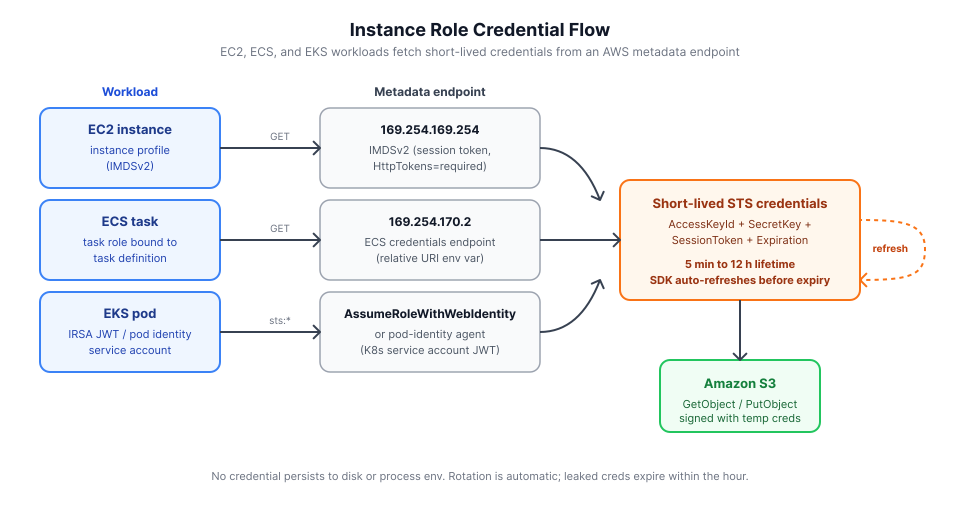
Instance roles are the strongest option for workloads running inside AWS. The SDK calls a metadata endpoint, gets back short-lived credentials, and refreshes them before expiry. Nothing persists to disk, nothing sits in the environment, and the SDK handles rotation. Three flavors cover the AWS compute surface:
- EC2 via IMDSv2: an instance profile attached to the EC2 instance. The SDK hits
169.254.169.254with a session token. EnforceHttpTokens=requiredandHttpPutResponseHopLimit=1so a compromised container on the host cannot reach the endpoint from inside another hop. AWS recommends hop limit2only for workloads where containers on the host call IMDS directly; when ECS task roles or EKS IRSA are in use (as described below), containers have their own credential endpoint and hop limit1is the stricter, supported choice. - ECS task role: the SDK reads the
AWS_CONTAINER_CREDENTIALS_RELATIVE_URIenvironment variable and fetches credentials from169.254.170.2. The role binds to the task definition rather than the host, so sibling tasks cannot see each other's credentials. - EKS IRSA and EKS pod identity: IRSA projects a service-account JWT into the pod and the SDK calls
AssumeRoleWithWebIdentity. EKS pod identity (the newer addon) cuts out the web-identity exchange and hands credentials directly through a local agent. Both scope credentials to a Kubernetes service account rather than the node.
--source-auth iam works identically in all three because the AWS SDK it delegates to already knows which metadata endpoint to call. The same godwit sync invocation runs unchanged from EC2 to ECS to EKS, which is usually what you want when the same job moves between environments. Two-sided IAM (source and destination both resolving to instance roles in the same cluster) is the zero-stored-secret pattern for same-account replication:
Bash/zsh:
godwit sync \
  --source s3://my-bucket \
  --destination s3://dest-bucket \
  --source-endpoint s3.amazonaws.com \
  --source-auth iam \
  --destination-endpoint s3.amazonaws.com \
  --destination-auth iam \
  --state-path ./state.db \
  --run-id auth-iam
PowerShell:
godwit sync `
  --source s3://my-bucket `
  --destination s3://dest-bucket `
  --source-endpoint s3.amazonaws.com `
  --source-auth iam `
  --destination-endpoint s3.amazonaws.com `
  --destination-auth iam `
  --state-path ./state.db `
  --run-id auth-iam
STS AssumeRole for Cross-Account Access
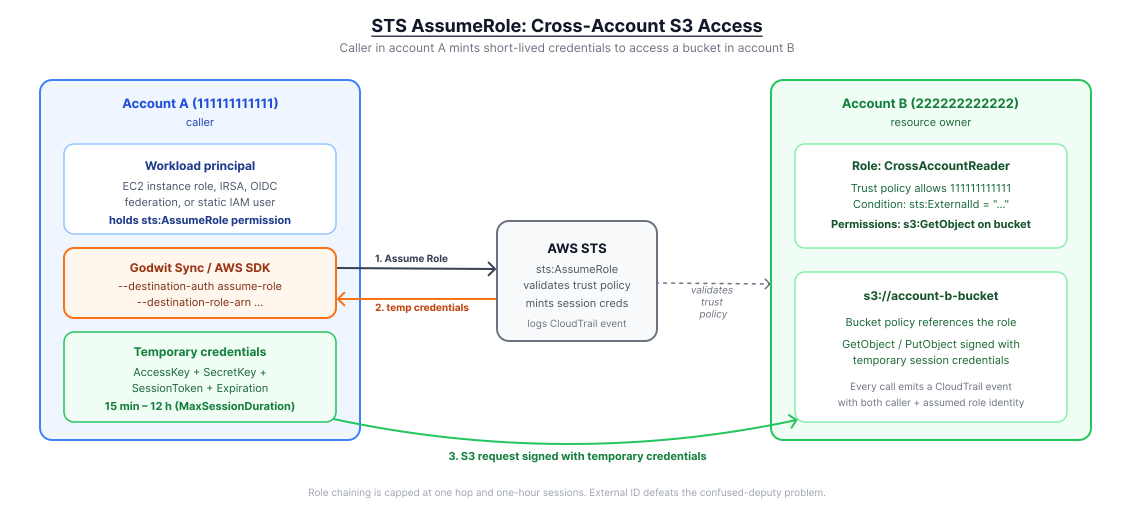
Cross-account S3 access is the reason STS AssumeRole exists. When the bucket sits in one account and the workload in another, cross-account IAM replaces credential sharing. The target account publishes a role with a trust policy naming the caller's account (or a specific principal within it), the caller holds sts:AssumeRole permission on that ARN, and every request gets signed with credentials minted by STS. Session duration is bounded by the role's MaxSessionDuration (1 to 12 hours). An external ID on the trust policy protects against the confused-deputy problem when the caller is a third party. Each hop in a role chain (a role session assuming another role) caps the new session at one hour regardless of MaxSessionDuration, so avoid designing workflows that chain through multiple intermediate roles.
The value of AssumeRole for data movement is that you get least-privilege, time-boxed, auditable access across a trust boundary without sharing any long-lived material. Every call emits a sts:AssumeRole CloudTrail event with the caller identity, so the audit trail names a specific principal.
Godwit Sync's source and destination auth are independent, so a realistic cross-account migration pairs the two modes. The sts:AssumeRole call must itself be signed by an AWS identity, so --source-auth assume-role needs a caller credential, distinct from the temporary credentials it returns. The --source-auth assume-role flag accepts two caller-credential shapes:
- Explicit caller keys: pass
--source-access-key/--source-secret-keyand Godwit Sync signs thests:AssumeRolecall with them. Right for off-AWS callers (laptop, colo, a CI system without OIDC) where no ambient credential exists. - Default-chain caller: omit the key flags entirely and Godwit Sync resolves the caller from environment variables → shared credentials file → IMDS, in that order. On EC2 / ECS / EKS this lets the instance or task role sign the STS call. No long-lived key anywhere.
The single-side variant with an explicit caller (source reads via AssumeRole, destination is a local filesystem):
Bash/zsh:
godwit sync \
  --source s3://account-b-bucket \
  --destination /data \
  --source-endpoint s3.amazonaws.com \
  --source-auth assume-role \
  --source-access-key $AWS_ACCESS_KEY_ID \
  --source-secret-key $AWS_SECRET_ACCESS_KEY \
  --source-role-arn arn:aws:iam::222222222222:role/CrossAccountReader \
  --source-role-session migrate-2026-04 \
  --state-path ./state.db \
  --run-id auth-assume-role
PowerShell:
godwit sync `
  --source s3://account-b-bucket `
  --destination /data `
  --source-endpoint s3.amazonaws.com `
  --source-auth assume-role `
  --source-access-key $env:AWS_ACCESS_KEY_ID `
  --source-secret-key $env:AWS_SECRET_ACCESS_KEY `
  --source-role-arn arn:aws:iam::222222222222:role/CrossAccountReader `
  --source-role-session migrate-2026-04 `
  --state-path ./state.db `
  --run-id auth-assume-role
The mixed variant (source reads via the caller's own instance role, destination assumes a role in the partner account) is the typical shape of a production cross-account migration. Running on EC2 with no static keys anywhere, the instance role does two jobs: it signs the source-side S3 reads directly under --source-auth iam, and it signs the sts:AssumeRole call on the destination side. The EC2 instance role needs one extra permission (sts:AssumeRole on the partner role ARN), and the partner account's role trust policy must trust the instance role's ARN; after that, this command works with zero long-lived material in the environment:
godwit sync \
  --source s3://source-account-bucket \
  --destination s3://partner-account-bucket \
  --source-endpoint s3.amazonaws.com \
  --source-auth iam \
  --destination-endpoint s3.amazonaws.com \
  --destination-auth assume-role \
  --destination-role-arn arn:aws:iam::333333333333:role/PartnerWriter \
  --destination-role-session migrate-2026-04 \
  --state-path ./state.db \
  --run-id auth-xaccount
GitHub Actions OIDC to AWS S3 (web-identity)
--source-auth web-identity is for CI platforms that provide OIDC tokens. The mode reads a JWT from a file (--source-token-file, or AWS_WEB_IDENTITY_TOKEN_FILE as a fallback), calls sts:AssumeRoleWithWebIdentity, and signs S3 requests with the resulting short-lived session.
For GitHub Actions, aws-actions/configure-aws-credentials handles the OIDC exchange and writes the resulting temporary credentials to the environment. Godwit Sync's env mode picks them up directly:
- uses: aws-actions/configure-aws-credentials@v4
  with:
    role-to-assume: arn:aws:iam::123456789012:role/GodwitSyncRole
    aws-region: eu-west-1
    role-session-name: godwit-${{ github.run_id }}
- run: |
    godwit sync \
      --source s3://src-bucket \
      --destination s3://dst-bucket \
      --source-endpoint s3.amazonaws.com \
      --source-region eu-west-1 \
      --source-auth env \
      --destination-endpoint s3.amazonaws.com \
      --destination-region eu-west-1 \
      --destination-auth env \
      --state-path ./state.db \
      --run-id auth-web-identity
The action exports AWS_ACCESS_KEY_ID, AWS_SECRET_ACCESS_KEY, and AWS_SESSION_TOKEN; the role-session-name becomes the CloudTrail principal, keeping audit trails readable. GitLab, Buildkite, and Jenkins-with-OIDC have analogous first-party integrations; use the platform's credential step and --source-auth env to consume the result.
Anonymous Access for Public Buckets
Anonymous S3 access works against public datasets on the AWS Open Data Registry (NOAA, nyc-tlc, Common Crawl, Sentinel-2), whose bucket policy grants s3:GetObject to Principal: "*". Sending credentials you happen to have makes the request slower and can actively fail: if the caller's own account has an SCP or bucket policy that denies unsigned identity leakage on cross-account reads, a signed request to a public dataset breaks while an unsigned one succeeds. Anonymous access is not a permission bypass, only a match for a permissive target policy.
--source-auth anonymous skips signing entirely. It pairs well with any authenticated mode on the other side, so a one-liner can pull from an Open Data bucket into a private destination with the correct credential model on each end:
Bash/zsh:
godwit sync \
  --source s3://noaa-goes16/ABI-L1b-RadC/2024/001/00 \
  --destination /data \
  --source-endpoint s3.amazonaws.com \
  --source-auth anonymous \
  --state-path ./state.db \
  --run-id auth-anonymous
PowerShell:
godwit sync `
  --source s3://noaa-goes16/ABI-L1b-RadC/2024/001/00 `
  --destination /data `
  --source-endpoint s3.amazonaws.com `
  --source-auth anonymous `
  --state-path ./state.db `
  --run-id auth-anonymous
The Default Credential Chain
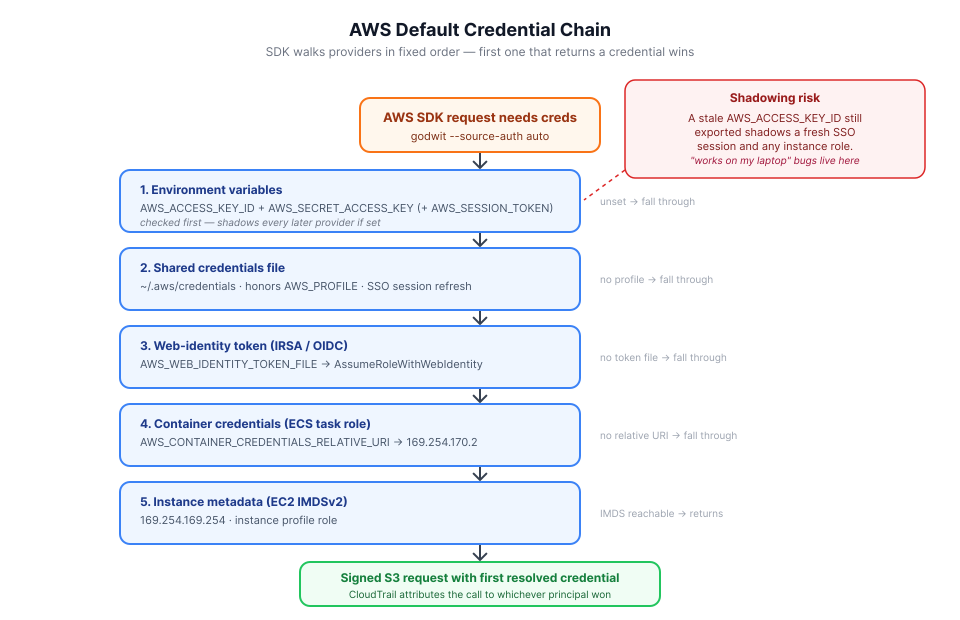
The AWS default credential chain is what you get when no auth mode is specified. The SDK walks a fixed sequence of AWS credential providers: environment variables, then the shared credentials file (honoring AWS_PROFILE), then a web-identity token (AWS_WEB_IDENTITY_TOKEN_FILE, which is how IRSA resolves), then container credentials (ECS task-role endpoint), then instance metadata. The first provider that returns a credential wins. The appeal is portability: the same code runs on a laptop with a profile, a CI runner with env vars, and an EC2 instance with an instance role, without branching.
The downside is the same feature working against you. A developer with a stale AWS_ACCESS_KEY_ID still exported will shadow a newer SSO session and every EC2 instance role the same binary would otherwise use. The method that makes code portable across environments also hides the active credential, and that opacity shows up as "works on my laptop" bugs and, worse, as CloudTrail entries attributed to the wrong principal. In production, be explicit so the next operator and your audit pipeline both see which auth method is in play.
--source-auth auto is the explicit version of "let the SDK decide". It is a safe starting point for exploratory commands and environments where the credential source is already configured, with the same gotchas. Lock to a specific mode for anything that ships.
Bash/zsh:
godwit sync \
  --source s3://my-bucket \
  --destination /data \
  --source-endpoint s3.amazonaws.com \
  --source-auth auto \
  --state-path ./state.db \
  --run-id auth-auto
PowerShell:
godwit sync `
  --source s3://my-bucket `
  --destination /data `
  --source-endpoint s3.amazonaws.com `
  --source-auth auto `
  --state-path ./state.db `
  --run-id auth-auto
Godwit Sync Auth Flag Reference
The flags used above, described once so each example stays focused on the mechanism rather than the syntax. Godwit Sync's auth values mirror the AWS mechanism list one-to-one, so switching auth methods between environments changes exactly one flag.
--source-auth/--destination-auth: credential mode. Values:static,env,profile,iam,assume-role,web-identity,anonymous,auto. Independent per side.--source-access-key/--source-secret-key: required forstaticmode. Optional forassume-rolemode: when set, Godwit signs the STS call with those keys; when both are omitted, the caller credentials are resolved from the default chain (env → profile → IMDS), so the EC2/ECS/EKS instance or task role can sign the STS call and no long-lived key is ever handed to Godwit. Pass both or neither (mixing one key with an empty other is rejected at startup). Omit entirely forenv,profile,iam,web-identity,anonymous, andauto.--source-profile: named profile inside~/.aws/credentialsforprofilemode.AWS_PROFILEis the fallback.--source-role-arn: target role ARN forassume-roleandweb-identitymodes.--source-role-session: session name that appears in CloudTrail for the assumed session. Pick something traceable:hostname-date-runid(e.g.worker01-2026-04-19-auth-xaccount) makes attribution unambiguous when you're reading CloudTrail after an incident. Honored byassume-role;web-identityuses an auto-generated session name.--source-token-file: path to a web-identity / OIDC JWT on disk, used byweb-identitymode. Falls back toAWS_WEB_IDENTITY_TOKEN_FILEwhen not passed (matching the AWS SDK convention for EKS IRSA). For CI platforms, use the platform's credential action (e.g.aws-actions/configure-aws-credentials) and--source-auth envinstead.--source-endpoint: S3 API host.s3.amazonaws.comfor AWS; any S3-compatible host otherwise.--state-path/--run-id: not auth flags, but required for any Godwit Sync run. Each run writes to the state database under its run ID.
--destination-* counterparts exist for every --source-* flag. A config file (-f godwit.yml) accepts the same fields and keeps credentials out of shell history.
Decision Matrix: Pick the Right Method for Your Scenario
S3 authentication best practices come down to matching the deployment shape to the right credential mechanism. The table below maps each common deployment shape to the recommended auth mode and the exact Godwit Sync flags. Use it as the last checkpoint before a command goes into a production runbook.
| Scenario | Recommended auth | Why | --source-auth / --destination-auth |
|---|---|---|---|
| Local developer workstation | profile |
Reuses aws sso login sessions, scoped per-account |
profile with --source-profile |
| CI/CD pipeline (GitHub Actions) | web-identity |
Short-lived, no long-lived key in the repo secret store; fetch OIDC token to a file, point --source-token-file at it |
web-identity with --source-role-arn; or configure-aws-credentials action + env |
| CI/CD pipeline (GitLab, Jenkins with no OIDC) | env |
Secret manager injects short-lived keys per job | env |
| EC2 workload | iam |
IMDSv2 instance profile; automatic rotation | iam |
| ECS task | iam |
Task role via 169.254.170.2; scoped per-task |
iam |
| EKS pod | iam (IRSA or pod identity) |
Service-account-scoped, auto-rotated | iam |
| Lambda function | iam |
Execution role; environment pre-populated by the runtime | iam |
| Cross-account data migration | mixed iam + assume-role |
Caller reads via instance role, writes via STS; no key sharing | --source-auth iam --destination-auth assume-role |
| On-prem server or non-AWS cloud | assume-role via IAM Roles Anywhere, or static in a secret manager |
Roles Anywhere issues short-lived STS credentials from a private CA certificate, with no long-lived keys. Fall back to static only when PKI infrastructure is unavailable |
assume-role or static |
| Air-gapped CI | static |
No metadata service and no network to STS | static |
| Public dataset consumer | anonymous |
No credential needed; avoids cross-account identity leakage | anonymous on source side |
| Third-party SaaS integration | static with scoped IAM user, or assume-role with external ID |
SaaS vendor can rarely assume a role directly; external ID when they can | static or assume-role |
For new deployments, rank the options in the order: iam > assume-role > profile > env > static, and pick the first one the environment can support.
Common Anti-Patterns to Avoid
IAM best practices for S3 are as much about what to avoid as what to adopt. Credential incidents usually trace back to a handful of patterns that look convenient and compound badly:
- Baking access keys into AMIs or container images. Anything in the image leaks when the image is shared, copied, or scanned. Switch to
--source-auth iamon EC2 and the temptation disappears: the AMI no longer needs a key at all. - Static keys on a machine that has an instance role available. The role is already there, already rotated, and already scoped. Delete the static key and set
--source-auth iam. - One IAM user shared across a team. There is no accountability in CloudTrail and no way to revoke one person's access. Give each operator an SSO-backed profile and use
--source-auth profile. - Long-lived keys in GitHub Actions. GitHub's OIDC issuer plus an IAM role with a
token.actions.githubusercontent.comtrust policy gives you short-lived credentials per workflow run. Fetch the OIDC token in a setup step, write it to a file, and use--source-auth web-identity. Alternatively, useaws-actions/configure-aws-credentialsand--source-auth env. A working end-to-end setup is in the companion lab: GitHub Actions OIDC to AWS S3 with Godwit Sync. - Deep role chains. AWS caps each chained role session at 1 hour regardless of the target role's
MaxSessionDuration. Restructure so the caller assumes the target role directly in one hop; it is simpler and avoids the compounding timeout. - Disabling IMDSv2 to "make the SDK work". v1 is exploitable via SSRF on any service running on the instance. Re-enable v2 with
HttpTokens=required; a current AWS SDK handles v2 without configuration. - Stale environment variables shadowing the intended credential. The default credential chain picks up whatever
AWS_ACCESS_KEY_IDis exported first, including a key a developer set months ago in a shell profile on a CI runner. The process runs with the wrong identity, the wrong permissions, and CloudTrail attributes the activity to the wrong principal. Explicit--source-authmodes (iam,profile,assume-role) bypass the chain entirely and name the active credential up front; use them in any environment that ships.
FAQ
Which S3 authentication method is most secure?
Instance roles (EC2 IMDSv2, ECS task roles, EKS IRSA, or EKS pod identity) and AssumeRoleWithWebIdentity are the most secure: credentials are short-lived, auto-rotated by the SDK, scoped to a role's policy rather than a user's, and never written to disk. Static IAM-user access keys are the least secure because they live forever until a human rotates them and carry the full IAM user policy.
How long do STS temporary credentials last?
STS sessions last between 15 minutes and 12 hours, capped by the role's MaxSessionDuration. Each hop in a role chain (a role session assuming another role) is hard-capped at 1 hour regardless of MaxSessionDuration, so avoid chaining through multiple intermediate roles.
Can I authenticate to S3 from outside AWS without static keys?
Yes. Use STS AssumeRole with IAM Roles Anywhere (PKI-backed short-lived credentials from a private CA), or AssumeRoleWithWebIdentity if your CI platform issues OIDC tokens (GitHub Actions, GitLab, Buildkite, Jenkins-with-OIDC). Static keys are only the right answer for air-gapped runners and SaaS integrations that accept nothing else.
What's the order of the AWS default credential chain?
Environment variables → shared credentials file (honoring AWS_PROFILE) → web-identity token (AWS_WEB_IDENTITY_TOKEN_FILE, used by IRSA) → container credentials (ECS task role) → instance metadata (IMDS). The first provider that returns a credential wins, which is why a stale exported AWS_ACCESS_KEY_ID silently shadows newer SSO sessions and instance roles.
How do I authenticate GitHub Actions to S3 without long-lived keys?
Configure GitHub's OIDC issuer (token.actions.githubusercontent.com) as an IAM identity provider, create an IAM role with a trust policy scoped to your repo and branch, and use aws-actions/configure-aws-credentials to exchange the OIDC token for short-lived STS credentials. The end-to-end setup is in the companion lab: GitHub Actions OIDC to AWS S3 with Godwit Sync.
When should I use anonymous S3 access?
Only for public datasets on the AWS Open Data Registry (NOAA, nyc-tlc, Common Crawl, Sentinel-2) whose bucket policy grants s3:GetObject to Principal: "*". Sending credentials you happen to have can actively fail if your account has an SCP or bucket policy that denies cross-account identity leakage on unsigned reads.
Try It Hands-On
The companion lab provides a complete working environment with Terraform and a sample GitHub Actions workflow. It provisions the IAM OIDC provider, a repo-scoped role, and runs a Godwit Sync transfer authenticated entirely with short-lived OIDC credentials — no long-lived keys anywhere.
Next Steps
This guide covered credential transport and lifecycle across every AWS S3 auth method. To put the CI/CD recommendation into practice end-to-end, work through the companion lab GitHub Actions OIDC to AWS S3 with Godwit Sync, which provisions the IAM OIDC provider, a repo-scoped role, and a runnable workflow. For the transfer command itself (resume, verification, parallelism, and metrics), see the S3 Migration Guide. For multi-bucket orchestration using YAML config files with ${ENV_VAR} expansion, see Migrate Multiple S3 Buckets in Parallel.