
Migrate MinIO to RustFS (2026): 3 Paths — Binary Swap, mc mirror, Godwit Sync
MinIO OSS was archived February 2026 with 6 unpatched CVEs. This guide covers every migration path to RustFS: the 5-minute binary swap, mc mirror for new servers, and Godwit Sync for multi-TB production environments with version history and Object Lock.
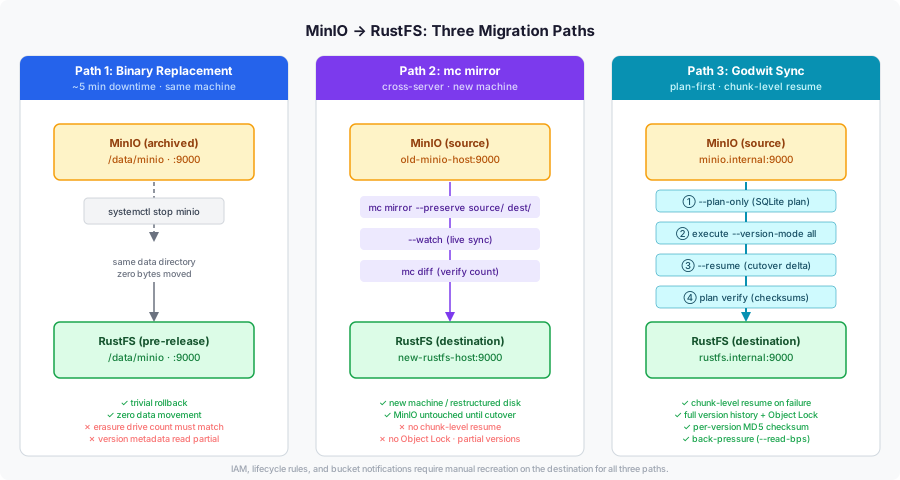
MinIO community edition reached end of life February 2026 with six unpatched CVEs and no free patch path. This guide covers every migration path to RustFS: the binary swap for same-machine deployments, mc mirror for cross-server moves, and Godwit Sync for production environments where version history, Object Lock, and chunk-level resume are requirements.
RustFS Is the Closest Drop-in Replacement for MinIO
RustFS is Apache 2.0 licensed, fully S3-compatible, and uniquely supports in-place migration: it reads MinIO's existing data directory without moving a byte. The RustFS project reports 2.3x throughput versus MinIO for small objects in the 4 KB range in their own benchmarks.
Before You Migrate
- Back up your data. Snapshot data volumes or run
mc mirrorto a separate destination before starting. - Record your MinIO config. Note
MINIO_ROOT_USER,MINIO_ROOT_PASSWORD, data paths, port bindings, TLS config, and any lifecycle rules or IAM policies. Non-data settings require manual recreation on RustFS regardless of migration path. - Check your MinIO version. Binary replacement works best with recent RELEASE builds. Very old AGPL-era builds may use a different on-disk format. Test on staging first.
- Plan your maintenance window. The binary swap requires a stop.
mc mirrorand Godwit Sync run live against the source and need only a short final delta sync at cutover.
Path 1: Binary Replacement Migrates MinIO In-Place
Stop MinIO, point RustFS at the same data directory, start RustFS. No data movement. Downtime is typically under five minutes.
Best for: single-node setups (single or multi-drive), same-machine migrations. Not for distributed clusters.
Single-node multi-drive
If MinIO was started with multiple drives, pass the same drives to RustFS in the same order. The drive count must match exactly — RustFS reads the same erasure-coded layout MinIO wrote.
systemctl stop minio

rustfs /data/disk1 /data/disk2 /data/disk3 /data/disk4 \
  --address :9000 \
  --console-enable \
  --console-address :9001 \
  --access-key your-admin-key \
  --secret-key your-secret-key
Wrong drive count = unreadable data. If MinIO used 4 drives, RustFS must get the same 4 paths. Adding or removing drives changes the erasure coding layout and will fail to read existing objects.
Distributed cluster (multiple nodes)
Binary replacement is not viable for distributed MinIO clusters. RustFS distributed mode is still listed as under testing upstream as of May 2026 — do not use it for a production cutover today.
Use Path 2 or Path 3 instead: keep the MinIO cluster running as the source and migrate data to a fresh single-node RustFS deployment (or wait for RustFS distributed mode to stabilize). Cut over at the DNS or load-balancer level once migration is complete.
Binary install (single-node, single path)
# Stop MinIO
systemctl stop minio

# Download latest RustFS release (all releases are pre-release; /releases/latest does not resolve)
curl -sL "https://api.github.com/repos/rustfs/rustfs/releases" \
  | jq -r '[.[] | select(.assets | length > 0)][0].assets[]
      | select(.name == "rustfs-linux-x86_64-gnu-latest.zip")
      | .browser_download_url' \
  | xargs curl -LO
unzip rustfs-linux-x86_64-gnu-latest.zip
chmod +x rustfs && mv rustfs /usr/local/bin/rustfs

# RustFS runs as UID 10001 — fix permissions on the data directory
chown -R 10001:10001 /data/minio

# Start RustFS against the same data path MinIO used
rustfs /data/minio \
  --address :9000 \
  --console-enable \
  --console-address :9001 \
  --access-key your-admin-key \
  --secret-key your-secret-key
Open http://your-server:9001. If your buckets and objects are visible, the migration is complete.
systemd service
# /etc/systemd/system/rustfs.service
[Unit]
Description=RustFS Object Storage
After=network.target

[Service]
User=rustfs
Group=rustfs
ExecStart=/usr/local/bin/rustfs /data/minio \
  --address :9000 \
  --console-enable \
  --console-address :9001
Environment=RUSTFS_ACCESS_KEY=your-admin-key
Environment=RUSTFS_SECRET_KEY=your-secret-key
Restart=always
RestartSec=5

[Install]
WantedBy=multi-user.target
useradd -r -u 10001 -s /sbin/nologin rustfs
chown -R rustfs:rustfs /data/minio
systemctl daemon-reload
systemctl enable --now rustfs
systemctl status rustfs
Path 2: mc mirror Copies Data to a New Server
Use mc mirror when moving to a different machine, restructuring disk layout, or when you want to verify the new server before cutting over.
Best for: cross-server migrations, restructured storage, cloud-to-self-hosted moves.
# Register both endpoints
mc alias set source http://old-minio-host:9000 MINIO_ACCESS_KEY MINIO_SECRET_KEY
mc alias set dest   http://new-rustfs-host:9000 RUSTFS_ACCESS_KEY RUSTFS_SECRET_KEY

# Mirror all buckets — --preserve retains metadata, tags, timestamps
mc mirror --preserve source/ dest/

# For large datasets: keep mirroring live to minimize cutover lag
mc mirror --preserve --watch source/ dest/ &
Final cutover:
systemctl stop minio
mc mirror --preserve source/ dest/   # catch any final writes
# Update DNS or load balancer to the RustFS endpoint
mc mirror has three limits that matter at production scale:
- No chunk-level checkpoint. A network failure or OOM at 38 TB of a 40 TB migration restarts the entire transfer from the beginning — not from the last object, certainly not from the last chunk.
- No version history.
mc mirrorcopies only the current version of each key. Noncurrent versions and delete markers stay behind on MinIO. The tool has no flag for version history; the MinIO docs recommendmc replicatefor versioned buckets, which is a replication tool, not a cross-server migration tool. - No Object Lock. GOVERNANCE and COMPLIANCE retention metadata, legal holds, and retain-until dates are not read or written by
mc mirror. If you copy a locked object, the lock is gone on the destination.
If none of these apply — small dataset, no versioning, no compliance requirements — mc mirror is fine. If any apply, use Path 3.
Path 3: Godwit Sync Handles Production Scale
Godwit Sync addresses each of mc mirror's three failure modes directly. It checkpoints at the chunk level so a failed transfer resumes from the last verified byte, not from zero. It migrates the full version chain — current versions, noncurrent versions, and delete markers — with --version-mode all. And it reads and writes Object Lock metadata per version with --object-lock, preserving GOVERNANCE and COMPLIANCE retention and legal holds exactly as they existed on the source.
| Capability | Godwit Sync | mc mirror |
|---|---|---|
| Preview before any data moves | ✅ --plan-only generates a SQLite plan |
❌ |
| Resume interrupted transfer | ✅ Chunk-level — resumes from last verified byte | ⚠️ Object-level — restarts large objects |
| Full version history | ✅ --version-mode all |
⚠️ Latest only; re-run bugs documented |
| Object Lock and WORM | ✅ --object-lock — GOVERNANCE/COMPLIANCE + legal hold per version |
❌ |
| End-to-end checksum | ✅ MD5 per version | ⚠️ ETag only |
| Back-pressure on live source | ✅ --read-bps, --rps, --max-inflight |
❌ |
| Prometheus metrics | ✅ Built-in via --status-addr |
❌ |
Best for: multi-TB migrations, full version history, Object Lock (GOVERNANCE/COMPLIANCE), compliance requirements, or anywhere mc mirror's lack of chunk-level resume is an operational risk.
Before you run the plan: create the destination bucket with Object Lock enabled
Object Lock can only be enabled at bucket creation time — it cannot be turned on after the fact. Versioning can be enabled later, but Object Lock cannot. Create the destination bucket on RustFS before running Godwit Sync:
mc mb --with-lock dest/rustfs-bucket
If you create the bucket without --with-lock and then run Godwit Sync with --object-lock, the transfer will fail when it tries to apply retention metadata to the first locked object. Fix: delete the bucket, recreate it with --with-lock, and re-run the plan.
Step 1: Generate a plan — nothing moves yet
godwit sync \
  --source s3://minio-bucket \
  --source-endpoint minio.internal:9000 \
  --source-access-key minio-access-key \
  --source-secret-key minio-secret-key \
  --source-secure=false \
  --destination s3://rustfs-bucket \
  --destination-endpoint rustfs.internal:9000 \
  --destination-access-key rustfs-access-key \
  --destination-secret-key rustfs-secret-key \
  --destination-secure=false \
  --version-mode all \
  --object-lock \
  --run-id minio-to-rustfs-prod \
  --state-path ./godwit.state.db \
  --plan-only
--plan-only walks the source and writes a deterministic SQLite plan of every bucket, object, and version. Inspect the plan output before proceeding.
Step 2: Execute with back-pressure against the live source
godwit sync \
  --source s3://minio-bucket \
  --source-endpoint minio.internal:9000 \
  --source-access-key minio-access-key \
  --source-secret-key minio-secret-key \
  --source-secure=false \
  --destination s3://rustfs-bucket \
  --destination-endpoint rustfs.internal:9000 \
  --destination-access-key rustfs-access-key \
  --destination-secret-key rustfs-secret-key \
  --destination-secure=false \
  --version-mode all \
  --object-lock \
  --run-id minio-to-rustfs-prod \
  --state-path ./godwit.state.db \
  --read-bps 209715200 \
  --max-inflight 32 \
  --status-addr :8080 \
  --brief
--read-bps 209715200 limits source reads to 200 MB/s so MinIO stays responsive under load. --status-addr :8080 exposes a Prometheus-compatible metrics endpoint for monitoring.
Step 3: Cutover — resume from the last verified chunk
systemctl stop minio

godwit sync \
  --resume \
  --run-id minio-to-rustfs-prod \
  --source s3://minio-bucket \
  --source-endpoint minio.internal:9000 \
  --source-access-key minio-access-key \
  --source-secret-key minio-secret-key \
  --source-secure=false \
  --destination s3://rustfs-bucket \
  --destination-endpoint rustfs.internal:9000 \
  --destination-access-key rustfs-access-key \
  --destination-secret-key rustfs-secret-key \
  --destination-secure=false \
  --state-path ./godwit.state.db \
  --brief
--resume picks up from the last verified chunk using the state database. The run ID ties the resume to the original plan. Only objects and versions written after the last successful checkpoint transfer; everything already copied is skipped.
Free to start. Permanent 50 GB/run free tier. Unlimited for 30 days after registration. No credit card. Create a free account
What Migrates and What Requires Manual Reconfiguration
| What | Binary replacement | mc mirror | Godwit Sync |
|---|---|---|---|
| Object data | ✅ In-place | ✅ Copied | ✅ Stream-to-stream |
| Bucket structure | ✅ | ✅ | ✅ |
| Object metadata and tags | ✅ | ✅ with --preserve |
✅ Full fidelity |
| Object versioning history | ⚠️ Partial | ⚠️ Partial | ✅ --version-mode all |
| Object Lock and WORM | ⚠️ Partial | ❌ | ✅ Per-version, --object-lock |
| Chunk-level resume | ✅ N/A (in-place) | ❌ | ✅ Resumes from last byte |
| IAM users and policies | ✅ In-place | ⚠️ Bulk import | ⚠️ Bulk import |
| Access keys (non-root) | ✅ In-place | ⚠️ Bulk import | ⚠️ Bulk import |
| Bucket lifecycle rules | ⚠️ Reconfigure | ⚠️ Reconfigure | ⚠️ Reconfigure |
| Bucket notifications | ⚠️ Reconfigure | ⚠️ Reconfigure | ⚠️ Reconfigure |
| TLS certificates | ✅ Reuse | ✅ Reuse | ✅ Reuse |
| Erasure coding config | ⚠️ Same drive count | ✅ Reconfig on dest | ✅ S3 API layer — transparent |
IAM behavior depends on the path. The binary swap reads MinIO's existing config directory, so built-in users, policies, and access keys carry over in place. The mc mirror and Godwit Sync paths move only object data, so IAM needs a separate bulk export and import. Lifecycle rules and bucket notifications require manual recreation regardless of path. For the full IAM migration procedure, see Migrate MinIO IAM to RustFS.
Verify the Migration Before Decommissioning MinIO
For mc mirror migrations, compare object counts and run a diff:
mc ls --recursive source/my-bucket | wc -l
mc ls --recursive dest/my-bucket   | wc -l
mc diff source/my-bucket dest/my-bucket
For Godwit Sync migrations, run a post-transfer checksum verification:
godwit plan verify \
  --run-id minio-to-rustfs-prod \
  --destination s3://rustfs-bucket \
  --destination-endpoint rustfs.internal:9000 \
  --destination-access-key rustfs-access-key \
  --destination-secret-key rustfs-secret-key \
  --destination-secure=false \
  --state-path ./godwit.state.db \
  --brief
plan verify re-reads destination objects and compares them against the checksums recorded in the plan. For a thorough verification walkthrough including per-version inspection, see Verifying S3 Migrations.
Rollback: Both mc mirror and Godwit Sync Leave MinIO Intact
Binary replacement: MinIO and RustFS share the same data directory. Stopping RustFS and restarting MinIO is instant.
systemctl stop rustfs
minio server /data/minio --console-address :9001
mc mirror and Godwit Sync: Your original MinIO instance is untouched until you explicitly decommission it. Redirect DNS or your load balancer back to the old endpoint to roll back instantly. Keep MinIO running until you have confirmed the RustFS deployment is stable.
Frequently Asked Questions
Is MinIO still maintained in 2026? No. The repository was archived February 13, 2026 — read-only, no patches. Six CVEs in the final OSS release have no free fix; security patches are AIStor-only.
Is RustFS a drop-in replacement for MinIO? Yes, for most single-node and simple multi-volume deployments. RustFS is fully S3-compatible and can run against MinIO's existing data directory without data movement. The binary replacement works directly; Docker Compose users swap the image and keep the same named volumes.
Can I migrate MinIO to RustFS without downtime?
Almost. The binary replacement requires stopping MinIO, typically 2 to 5 minutes. The mc mirror --watch and Godwit Sync approaches run live against the source. The cutover window shrinks to the time needed for a final delta sync.
Does mc mirror preserve MinIO version history?
No. mc mirror copies only the current version of each key and has no flag for version history. For full version history migration, use Godwit Sync with --version-mode all. See S3 Version History Migration for a detailed walkthrough.
What about MinIO Object Lock and compliance retention?
mc mirror does not preserve Object Lock settings. If your MinIO deployment uses GOVERNANCE or COMPLIANCE retention modes or legal holds, use Godwit Sync with --object-lock. Godwit Sync reads and applies the correct retention mode and retain-until date per individual version.
Does migrating from MinIO to RustFS require new S3 credentials?
For the binary replacement path, you provide new access and secret keys when starting RustFS. All S3 clients need those updated credentials. For mc mirror and Godwit Sync paths, MinIO credentials remain active until you decommission it; only the endpoint URL changes at cutover.
Is the MinIO Client (mc) compatible with RustFS?
Yes. mc works with any S3-compatible endpoint. Re-point your existing alias: mc alias set myminio http://rustfs.internal:9000 NEW_KEY NEW_SECRET.
What is Godwit Sync?
Godwit Sync is a plan-first S3 migration tool for production-scale moves between S3-compatible stores. It supports full version history with --version-mode all, Object Lock preservation with --object-lock, chunk-level resume, per-version MD5 verification, and back-pressure against live sources. Free tier: 50 GB/run permanently, unlimited for 30 days after registration.
RustFS is an independent open-source project. "MinIO" is a registered trademark of MinIO, Inc. References to MinIO are for compatibility and comparison purposes only.